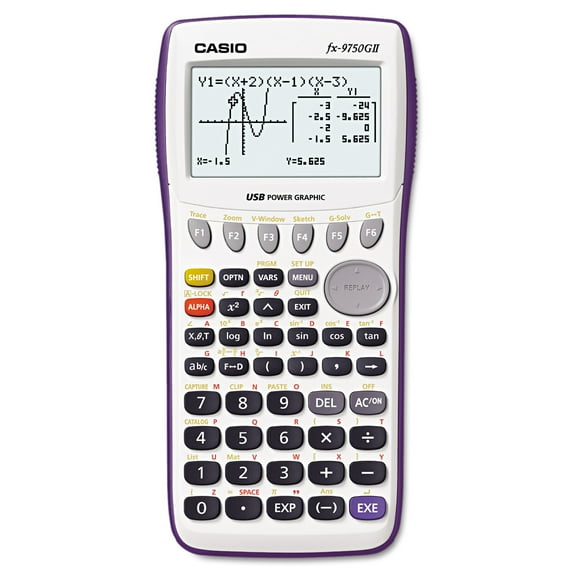
This whole story starts when my dad picked up a graphing calculator at the thrift store a few months ago. He told me it was possible to program it and gave it to me so I could try to figure it out. The model of the calculator is a CASIO FX-9750GII and I've spent the last few months trying to figure out how to work it.
Before we get into how I learned to program it, let's look at what we're working with here. The calculator is a CASIO FX-9750GII. It was released in 2009. This is by no means a high-tech graphing calculator. It has a total screen resolution of 128x64, about 60 kilobytes of user memory, and a super advanced icon menu. You might be wondering why it would be so hard to program a calculator like this, especially because similar CASIO calculators allow you to program in python. The thing is, this calculator can only be programmed in a device specific CASIO BASIC variant language. You can't program on a computer. You have to use the tiny display on the calculator with the buttons that sometimes don't even register.
Once I got the calculator, I saw that it used a custom language. Naturally I did some Google searching for some kind of tutorial or documentation. It turns out, (at least at the time of my search,) there isn't any documentation. Sometimes the Google Assistant AI review would spit out some function, but it was prone to hallucination and wasn't really helpful. I knew there was only one thing left to do. I had to trial and error my way through the syntax and slowly grew the skills to make a simple program. I remember the first program I made was a little interaction where the calculator asks you for a number and if the number is 2 it says "That number is 2" and if it's not it says "That number isn't too" and that was it. I think the next one I made was one that asked you for a password. It was alright but the password was always 1234 so it wasn't the most challlenging. It was after I made that I decided I had the skills to make something that resembles an actual game.
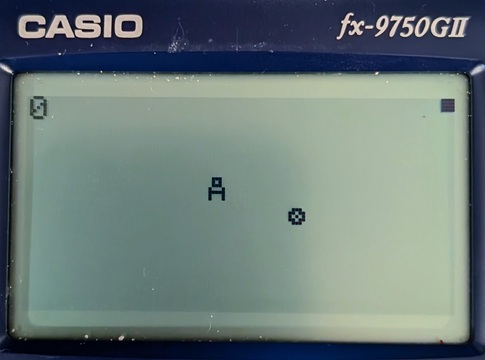
The first game I made was pretty simple. It's main gameplay is that you are a little guy who can move using the arrow buttons and you move around and collect little coins that randomly spawn everywhere on the map. I'll see if I can find a picture, but it also had a score in the top corner that told you how many coins you've collected. It helped me become more comfortable with a lot of different functions developing for the calculator. I learned how button inputs work, how to draw characters to the screen, and how to get a random number as well. Also, sorry for the bad image quality, my calculator is pretty dirty from bouncing around in my bag for a while.
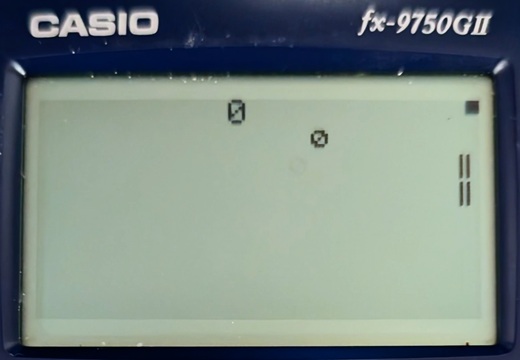
The next game I wanted to make was Snake. This was a bit ambitious considering my limitations. There is only two types of variables in CASIO BASIC. There's strings and numbers. In order to use a list, you needed to use functions to modify the lists in the statistics app of the calculator. Even with the statistics lists you could only get how long the list one and assign a value at an index. There was not popping or inserting or appending or really anything at all that you would find in a modern programming language (at least not that I could find.) So instead I scrapped the snake idea and decided to go for a simpler Pong game. Because there was only one set of arrows on the calculator, and I didn't particularly feel like implementing an AI, I made it so that there was only one paddle and the ball simply bounced off of the opposite wall. Every time it bounced off of your paddle the score increased and the game ran faster. An interesting note on making the game run faster, I had to artificially slow the processing down because this calculator doesn't have such luxuries as deltatime so I just made a for loop that adds 1+1 about 1000 times every frame so that it took a while to compute. The screen's refresh rate was also so bad that you couldn't run it at full speed or the pixel would barely turn on before it turns off again. Here's a picture of the pong game.
After the Pong game I sort of lost motivation for a while. I didn't really program any new games, but I did of course play pong in class when I was bored. Since then I actually tried my hand once again at making snake but to no avial. I got further than I did in the first attempt, with the length and movement of the snake, and even the fruit. The small screen inevitably made my already spaghetti code even more unbearable to try to navigate so I dropped the project. That just about brings us back to the present day with the story. It was overall a fun endevour and I think if you're ever bored you should maybe try picking up an old graphing calculator and becoming a pro game designer for a couple weeks.
Copyright ©2026 goblinpizzas.org All Rights Reserved. Contact Us.